Shopify Vs Shopify Plus: Key Differences
To see all the Shopify vs Shopify Plus key differences, let’s have a look at the given table:
| Feature | Shopify | Shopify Plus |
| Cost (per month) | $39-$399 | Starts at $2,000 |
| Level of scalability | Small to medium businesses | Enterprise-grade brands |
| Checkout customization | Limited | Advanced |
| API Access | Standard | Exclusive APIs |
| Automation tools | Limited | Shopify Flow, Scripts, Launchpad |
| Support | 24/7 | Dedicated account manager Priority support |
| Multi-store support | No | Yes |
What is the Right Time for Shopify Plus Migration?
Making the final decision on when to migrate is as important as whether you should migrate or not. Usually, businesses run into Shopify Plus too early, which may lead to unnecessary expenses. On the other hand, staying for too long on Shopify can stifle growth. Here, some clear signals are explained to assess when the right time is for migration to Shopify Plus:
Explosive sales: During peak seasons like Black Friday, your current Shopify store may face struggles. Shopify Plus takes care of high-volume spikes easily.
Checkout Limitation: With standard Shopify, there are checkout restrictions. For instance, you can’t create tiered discounts, personalized checkout experiences, and dynamic shipping rules. With Scripts and APIs, Shopify Plus opens this flexibility.
Too Many Manual Tasks: If your Shopify team spends hours processing refunds, adjusting inventories, or handling customer segments, Shopify Plus tools (Shopify Flow, Launchpad) save you time.
Third-party Apps Overload: You pay for apps for many advanced functions such as automation and discounts. Such features are already built into Shopify Plus.
Bonus tip: When your annual revenue is over $1M and you are planning to scale, Shopify Plus migration is the go-to e-commerce platform.
Shopify Plus Migration Cost
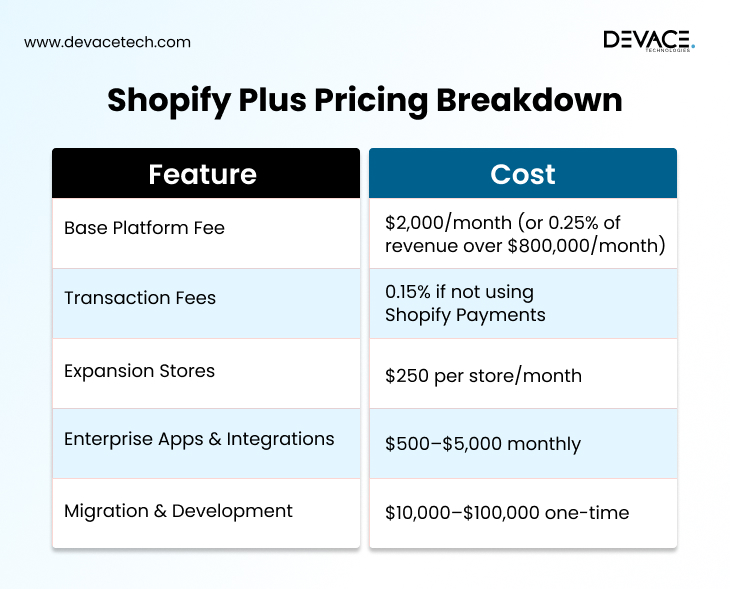
A question every business asks when they are planning to migrate their store to Shopify Plus is “how much does Shopify Plus cost?” In contrast with standard Shopify plans with fixed prices, Shopify Plus uses a revenue-based model.
Let’s have a look at the given table to check basic platform fee, transaction fee, store expansion charges, integration, and migration development costs:
10 Step Shopify Plus Migration Process
Here’s a 10-step proven Shopify Plus migration framework that experts adopt and you can also follow this for a smooth transition:
1. Pre-Migration Prep
Before starting the exact migration, you should start with the rigorous assessment of your existing store platform, and all other things matter, including:
- Inventory every object you want to move, like products (images, options, tags), customers (marketing status, addresses), collections (manual and automated), orders, and all content and SEO parts (blogs, pages, redirects, and structured data).
- Build a field mapping document that pairs Shopify entities (ProductVariant, Metafield, and product core fields) to your legacy schema.
Plan about how you will manage IDs, bundles, kits, discount logic, and tax and shipping models.
2. Setting Up Shopify Plus Store
Configure the fundamentals before any data flows. For Shopify Plus, in settings, set up tax regions, payments, markets (multi-region), and checkout extensibility. If you want to migrate multiple brands, decide on multi-store vs markets. A staging store if you want pre-production end-to-end tests and a development store for theme and app testing.
Install Shopify CLI and link a Git repo to have CI/CD themes and applications. With the help of a custom app, establish API access and give only the permissions you need.
npm install – g @ shopify/ cli @ shopify/theme
shopify login
shopify theme dev
3. Data Migration and Product Imports
Product imports involve some complexity. Normalize your legacy attributes into core fields of Shopify Plus (title, description, tags, vendors, product type) and then encode the rest in metafields. For performance and Bulk operations of very large catalogs, use the GraphQL Admin API. To manage media upload images to files first and then reference those URLs while creating products.
a- Building a product with variants (GraphQL)
By following these commands, a product can be created with variants:
import fetch from “ node – fetch ”;

const query = `

mutation productCreate ( $input : ProductInput!){

productCreate ( input : $input ){

product { id title handle status }

userErrors { field message }

}

};

const variables = {

input: {

title : “ Blue T-Shirt ",

status : “ ACTIVE ”,

handle : “ blue-t-shirt",

productType: "Apparel",

tags : [ “t-shirt” , “ blue” , “summer”],

options : [ “Size”],

variants : [

{ title : “ Small ” , price: “29.99”, sku: “TSHIRT-BLUE-S" },

{ title : “ Medium” , price: “31.99”, sku: “TSHIRT-BLUE-M" },

{ title : “ Large” , price: “ 33.99”, sku: “TSHIRT-BLUE-L" }

]

}

};

fetch ( “ https://yourstore.myshopify.com/admin/api/2025-01/graphql.json ”, {

method : “ POST”,

headers: {

“ Content-Type " : “application/json”,

“ X-Shopify-Access-Token" : “ your_access_token ”

};

body : JSON.stringify ({ query , variables })

}).then ( r=> r.json ()).then (console.log);
b- Attaching meta fields to store custom attributes
You can also attach metafields to store customer attributes:
const metafieldMutation = `

mutation metafieldsSet ( $metafields : [MetafieldsSetInput!]!){

metafieldsSet ( metafields : $metafields ){

metafields { id key namespace type value }

userErrors { field message }

}

}`;

await fetch ( GRAPHQL_URL, {

method : “POST”,

headers,

body : JSON.stringify ({

query : metafieldMutation,

variables : {

metafields : [{

ownerId : “ gid : // shopify/ Product/ PRODUCT_ID”,

namespace : “ migration ”,

key : “ legacy_product_id”,

type : “ single_line_text_field”,

value : “ 123456 ”

}]

}

})

});
c- Conducting bulk operations for large catalogs (GraphQL)
Here’s how to manage bulk operations in case of large catalogs:
const startBulk = `

mutation {

bulkOperationRunMutation (

mutation : """

mutation $( input : ProductInput!) {

productCreate ( input : $input ) {product { id }

userErrors { message }}

}

""",

stagedUploadPath : “ variables.jsonl ”

){ bulkOperation { id status } userErrors { message }}

}`;

// Upload a JSONL file where each line contains { “input”:{...product payload...}}
4. Customer Migration
Shopify never accepts raw passwords for security; customers should set new passwords. Migrate code identity, tags, legacy IDs, and Marketing opt-in status via metafields. While using loyalty systems sync to a loyalty app or store points/tier metafields. Moreover, for B2B on Shopify Plus, leverage Location, Price lists, and Company.
import requests

url =: “ https :// yourstore.myshopify.com/ admin/ api/ 2025-01/ customers.json”

headers = { “ X-Shopify-Access-Token" : “your_access_token” }

payload = {

“ customer ” :{

“first_name” : “John”,“last_name”: “Doe”, “email”:"john@example.com”,

“ verified_email” : True,

“tags” : “ migrated, newsletter”,

“ addresses” :[

{ “address1” : “123 Test St”, “city” : “ Los Angeles”, “province” : “CA” , “zip” : “90001” , “country” : “US"}

]

}

}

print ( requests.post (url ,json=payload , headers=headers).json())
Here’s how you can send account invites:
mutation customerSendInvite ( $input : CustomerSendInviteInput!){

customerSendInvite ( input : $input ) { userErrors { field message } }

}
5. Order Migration
Historical orders’ native API is restricted; teams mostly use partner permission or an import app to seed past orders for support and analytics. If it’s not feasible, migrate your orders to a data warehouse and surface them in the “Past My Orders” customer portal through the storefront API.
For refunded, partially paid, or subscription orders, manage bespoke handling. Also, you can create Draft Orders for pending transactions or wholesale POs, followed by completing them during Cutovers.
This coding example can be followed to build a draft order:
await fetch ( “ https: // yourstore . Myshopify.com/admin/api/2025-01/draft_orders.json”,{

method : “ POST ”,

headers : {“ Content-Type": “application/json” , “ X-Shopify-Access-Token" : “ your_access_token” },

body : JSON.stringify ({

draft_order:{

line_items [{ title : “ Blue T-Shirt" , price: “29.99”, quantity:2 }],

customer: { id : 1234567890 },

note : “ Migrated draft”,

use_customer_default_address:true

}

})

});
6. Migrating Store Themes
Mostly, instead of porting HTML verbatim, you generally build themes. Liquid and Online Store 2.0 of Shopify allow performant and modular templates. For theme migration, convert legacy snippets into sections, followed by moving inline scripts to assets, and then replacing platform-specific widgets with app blocks or Shopify equivalents.
When you plan to use structured content, you can render metafields directly in templates or with the help of the theme editor’s dynamic sources. Also, for headless storefronts, deploying Hydrogen/Storefront API is a good option.
For rendering a collection grid, Shopify developers can follow these commands:
{ % for product in collections [‘frontpage’].products%}

< article class= “product-card” >

<a href = “ {{ product.url }}”>

< img src = “{{ product.featured_image |img_url : ‘600x’ }}”

alt = “ {{ product . title }}”>

< h3 > {{ product . title }} < /h3 >

< p > {{ product.price | money }} </p>

< /a >

< /article >

{ % endfor % }
7. Automation via Shopify Plus
Create logic and powerful promotion on Shopify Plus with Shopify functions (shipping, payments, discounts). Shopify Flow takes care of event-driven automation. You can use Flow to tag customers, create orders, sync data to external systems through webhooks, and move orders through internal processes.
In case you use Shopify Scripts (Ruby) for checkout, then plan a path to functions. To ensure your migration reproduces VIP segments, tiered discounts, and legacy pricing rules-BOGO, codify promos as code.
An Example of a Script to Discount items over $100:
Eligible_items = Input.cart.line_items.select

{ |i|i.line_price > Money.new ( cents : 10000 )}

eligible_items.each { |i| i.change_line_price (i.line_price * 0.9, message : “10% off high-value items!” )}

Output.cart = Input.cart
8. Migrating Redirects and SEO
Because of redirects, metadata, and URL parity, SEO continuity is won or lost. To export every indexable URL, crawl your old site. Then map each to its new Shopify destination. For minimizing the redirect chain, preserve handles where you can. Migrate meta titles, meta descriptions, open graph tags, JSON-LD, and alt text. Also, to manage large redirect sets, keep chunks small or use the API to avoid throttling.
Here’s how to create redirects:
import requests , csv

headers = { “X-Shopify-Access-Token" : “your_access_token”}

with open ( “redirects.csv” ) as f:

rdr = csv.DictReader (f) # columns : from,to

for row in rdr:

payload = { “redirect”:{“path”:row ["from"], “target” :row[ [ “to”]}}

requests.post (“https://yourstore.myshopify.com/admin/api/2025-01/redirects.json”,

json=payload , headers=headers)
9. Testing and Quality Assurance
With comprehensive quality assurance (QA), you can prevent surprises on the launch day. Validate catalog integrity (option names, prices, taxability, inventory values, and variant counts), search (filters, synonyms), and collections (product assignment rules). Also, place end-to-end test orders across shipping tiers, discounts, payment methods, and tax regions. In the case of B2B, test company-specific terms and pricing.
For testing and successful quality assurance, business owners can hire Shopify developers who take care of everything, and you can focus on growth.
10. Go-Live
Once you are done with complete testing, schedule cutover during a low traffic window. On the legacy platform, freeze content, run data migration, and verify webhooks, emails, and live payments. Monitor search traffic, error logs, and conversion rates closely in the next 24-72 hours. Keep your old site temporarily on a subdomain to reference data when required.

Shopify Plus Migration Checklist
Before and after migration, you can tick this Shopify Plus migration checklist to avoid blunders:
- Planning-Audit your e-store, plan cutover, map fields
- Setting up Store-Development, staging, APIs, and payments
- Products-Import, inventory, variants, and metafields
- Customers-Import, account invites, legacy IDs
- Orders-Migrate, verify totals, map IDs
- Themes-Rebuild, migrate, test
- Automation-Scripts, Flow workflows, testing
- URLs and SEO-Map URLs, metadata, redirects
- Applications-Install, migrate data, test integrations
- Testing-Customers, orders, products, checkout
- Go-Live-Freeze content, migration, switch DNS
- Post-Migration-Performance, SEO, optimize, issues
What does a Minimal Migration Runner Look Like?
Let’s have a look at a minimal migration runner in this example:
// Pseudo-structure you can expand

import pLimit from “p-limit";

import fetch from “node-fetch”;

const limit = pLimit (5) ; // throttle concurrency

async function callGQL (query , variables={}) {

const res = await fetch (process.env.SHOP_URL+ “/admin/api/2025-01/graphql.json”,{

method : “POST”,

headers:{

“ Content-Type" : “application/json”,

“X-Shopify-Access-Token" : process.env.SHOP_TOKEN

},

body : JSON.stringify ({ query , variables })

});

const json = await res.json ();

if ( json.errors || json.data?.userErrors?.length) console.error (json);

return json.data;

}

// 1) migrate products from a CSV/DB

// 2) attach metafields (legacy IDs)

// 3) upload media

// 4) set inventory levels

// 5) create redirects

// ...compose each as idempotent tasks (safe to retry)
For a smooth migration, it is the best idea to hire Shopify Plus migration experts and leverage this platform in the true sense.
Common Shopify Plus Migration Challenges
Shopify Plus migration is a complex process, and you can face some challenges when moving your store to Shopify Plus. Let’s see what type of issues you may come across, associated risks, and how you can fix them:
| Challenges | Risks | Solution |
| Data loss | Missing orders or customers | Test imports Full backups |
| SEO Drop | Low Google ranks | Metadata migration and 301 redirects |
| Downtime | Revenue lost during store launch | Planned launch Staging environment |
| App issues | Some apps may not operate | Shopify Plus APIs |
| Budget concerns | Unexpected development costs | Define scope early |
Some Additional Tips for a Smooth Migration
We are giving some proven expert-recommended tips here that you can follow for a smooth transition:
- Focus on writing tasks so that rerunning them doesn’t duplicate records
- Implement exponential backoff with jitter
- Log every update with legacy-export and a reconciliation report
- Setting up product handles early to preserve SEO and match planned redirects
- Do a full import initially and then schedule updates until cutover
Wrapping Up
Shopify Plus migration is not just a technical process; it’s a complete growth strategy. By upgrading e-commerce stores, businesses unlock advanced checkout customization, automation, enterprise-level scalability, and global expansion opportunities. With a structured roadmap and the right migration experts, your brand can move smoothly, avoiding SEO loss and costly downtime. So, we can rightly say that Shopify is not just an expense-it’s an investment for future growth or your e-commerce brand.